How It Works
Start your trial in 3 steps.
The process is intentionally simple: download the MSI installer once, run the setup, then click Start 24h trial in the license window and test it right away.
Step 01
Download the installer
Grab the MSI installer once and keep it handy for a quick setup.
Step 02
Install and open
Run the MSI, finish setup, then launch MuMaster from Windows.
Step 03
Start the trial
Open the license window, click Start 24h trial, and test the same app right away.
Ready to test MuMaster now?
Install it once, try the 24h trial, and decide later if you want to move to a monthly license.
Quick install
No registration
24h free trial
Download MuMaster
Download the MSI installer, run it, and open the app to start your trial.
How to run
1
Download the installer
Save MuMaster_0.1.0_x64.msi from this page.
2
Install it
Open the MSI and follow the Windows setup prompts.
3
Start the trial
Launch MuMaster, open the license window, and click Start 24h trial.
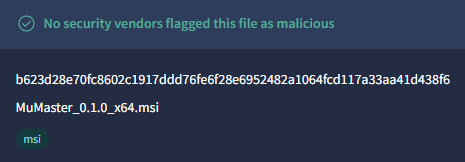
VirusTotal clean
Open reportVirusTotal shows that no security vendors flagged MuMaster_0.1.0_x64.msi as malicious.